Read three different fields in Coin Gacha
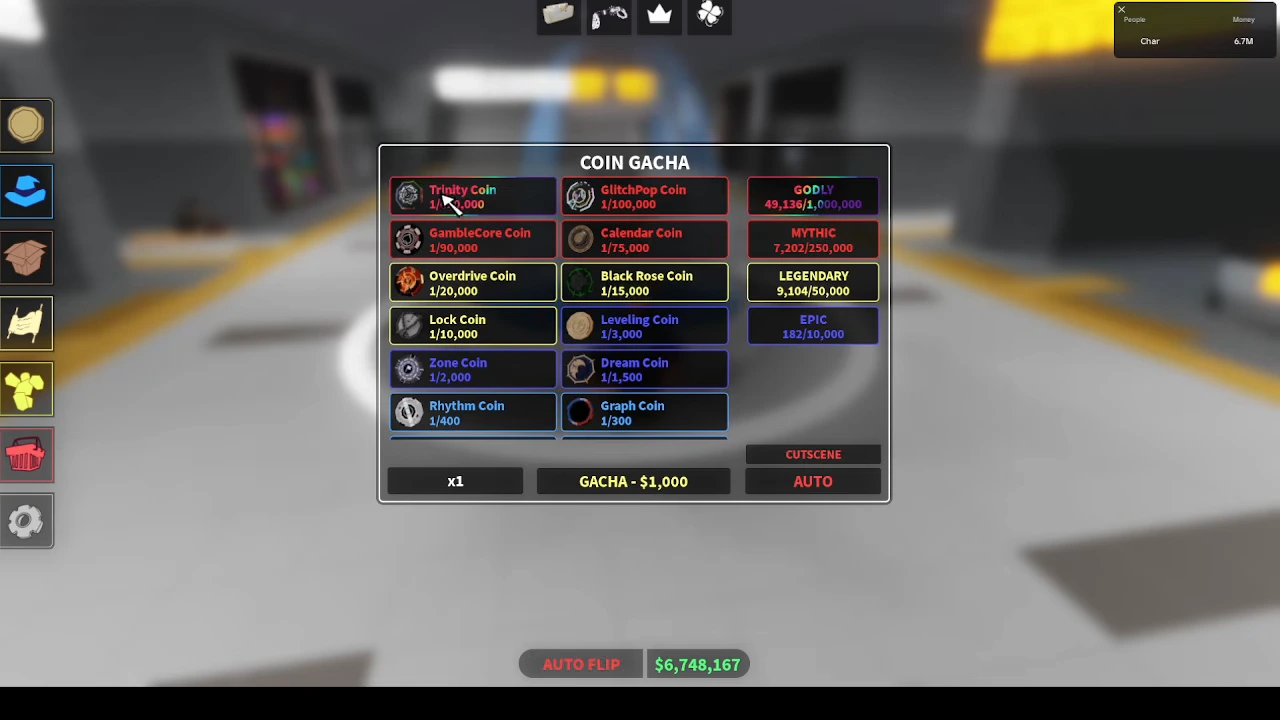
At the Fountain, open Coin Gacha and find the named coin in the list. In Char’s August 26 recording, GlitchPop Coin is labelled 1/100,000. The lower button separately shows an x1 Gacha action costing $1,000. Paying that button’s cost starts the selected roll action; it does not directly buy the GlitchPop entry.
The right-hand Godly, Mythic, Legendary and Epic boxes show separate counters with their own numerators and denominators. Do not substitute one of those counters for the label beside a particular coin. The footage does not establish a complete probability or guarantee formula for those counters.
These are observations of the recorded beta interface. The creator’s title mentions 2.1, but the exact game build is not shown. They are not an assertion that today’s catalog, price or counters are unchanged.
| Where to look | Recorded example | What to keep separate |
|---|---|---|
| Beside the named coin | GlitchPop: 1/100,000 | Coin rarity reference, not cash profit |
| Lower roll controls | x1; Gacha $1,000 | Selected roll action and its cash price |
| Right-hand rarity boxes | Godly / Mythic / Legendary / Epic counters | Separate category counters, not a named coin’s payout |
Inspect the earning action on that same coin
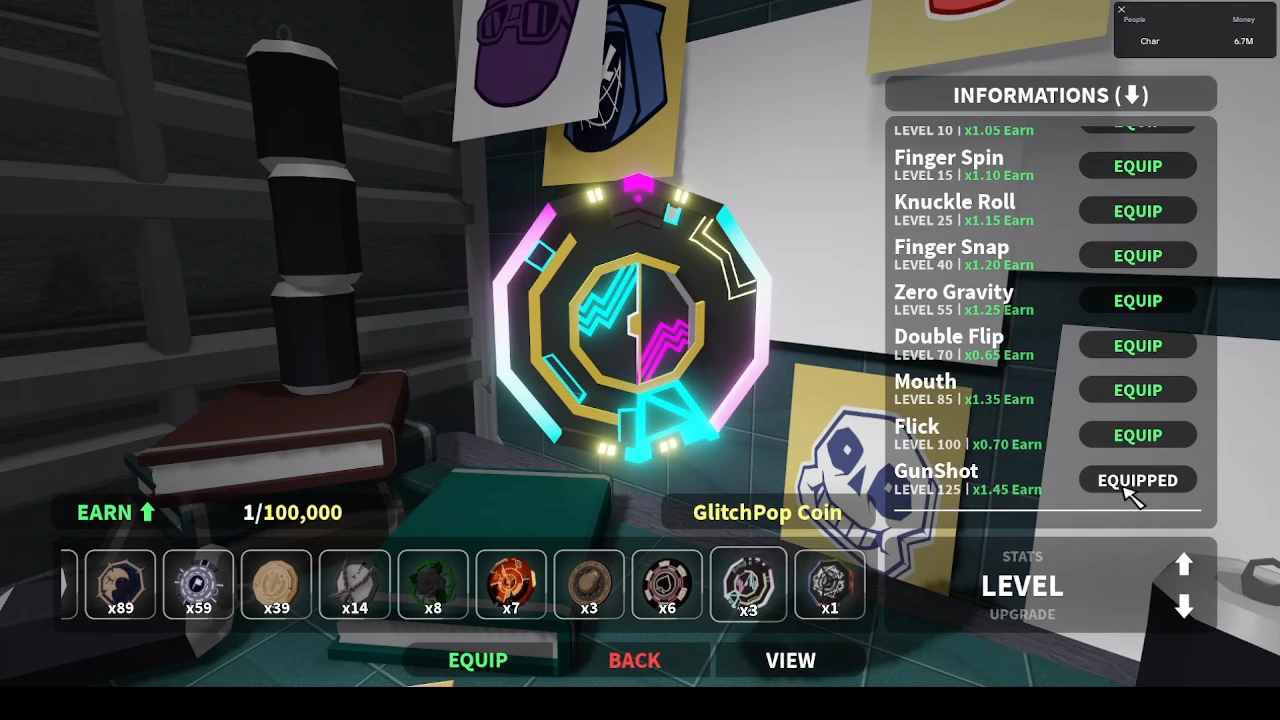
Open the coin inventory and select the coin you are comparing. GlitchPop’s inventory view retains the 1/100,000 label, while its Level list offers named actions with different level requirements and Earn multipliers. The recorded GunShot action is marked Equipped and lists a Level 125 requirement with ×1.45 Earn. Finger Spin appears separately at Level 15 with ×1.10 Earn. The lower button for GlitchPop itself still says Equip. This frame therefore proves the viewed coin’s saved action configuration, not that GlitchPop is currently being used to earn cash.
That is why rarity alone cannot describe the active earning configuration. Compare the actual equipped action, rather than assuming that the most visually striking coin or the largest denominator gives a fixed cash amount in every setup. The Earn multiplier is also a different field from the coin’s 1/N label.
- Select the coin you want to inspect in the inventory.
- Open its Level information and identify the action marked Equipped.
- Read that action’s level requirement and Earn multiplier together.
- Before comparing actual earnings, confirm that the coin itself is equipped; an Equipped action on a viewed coin does not establish that.
Include active equipment without inventing a combined formula
Accessory details can contain earning effects too. The recorded Sleepingbeauty necklace lists MoneyEarn +20%, alongside separate HeadChance, Exp and Luck lines. It is selected for inspection in the screenshot and its button says Equip, so the screenshot does not establish that this particular necklace is active on the character.
Use the equipment menu to distinguish an inspected item from an equipped one. Read the actual MoneyEarn effect on the item you use. Do not add its percentage to a coin’s rarity denominator or assume that multiplying every visible bonus reproduces the game’s final cash calculation; this recording does not establish that stacking formula.

Choose for the task you are doing
For a collection target, identify the exact missing coin and its named entry. For earning, compare the coin and the action that is actually equipped, plus active earning effects. For spending, read the current roll action and cost before starting it. These are separate decisions even when all three appear around the same Fountain.
A 1/N label is not a promise that N attempts will produce the item. The displayed category counters also do not provide enough evidence here to calculate a universal waiting time, probability sum or guaranteed cash return. For the older community profit records, use the coin reference with its stated limitations.